How to Share a Dashboard Without Paying Per Viewer
August 14, 2026
·
Tim Liu
You build the dashboard once. Then the client asks you to give access to the marketing manager, CEO, sales director, and finance team.
Suddenly, “share the dashboard” becomes a licensing question.
Who needs access? Does every viewer need an account? Does every viewer need a paid license? What happens when 10 viewers become 100? How do you make sure one client never sees another client’s data?
The right approach depends on who needs access, how sensitive the data is, and how your audience will grow. Here is how to choose a sharing model without letting viewer count turn into a recurring cost.
The First Question Is Not “How Do I Share It?”
Start with the viewer, not the dashboard.
There are four common audiences:
- Internal team members
- Known external users such as clients or partners
- Large groups of customers
- Public audiences
Each needs a different access model.
For example, an agency with five analysts and 20 clients has a different requirement from a SaaS company giving analytics access to 5,000 customers.
The agency might need a secure way to share dashboards with clients. The SaaS company needs customer-facing dashboards built into its product.
Google Looker Studio supports several sharing options, including specific people or groups, link sharing, scheduled PDF delivery, report links, and embedding.
So before choosing a dashboard sharing method, ask:
Who needs to see the data, and how will that audience grow?
The best way to share a dashboard depends on the audience. Internal teams often need user-based access, while clients may need restricted sharing. Large customer audiences often benefit from embedded analytics.
When Every Viewer Becomes a Line Item
This is where dashboard viewer licensing becomes a serious consideration.
Imagine an agency has:
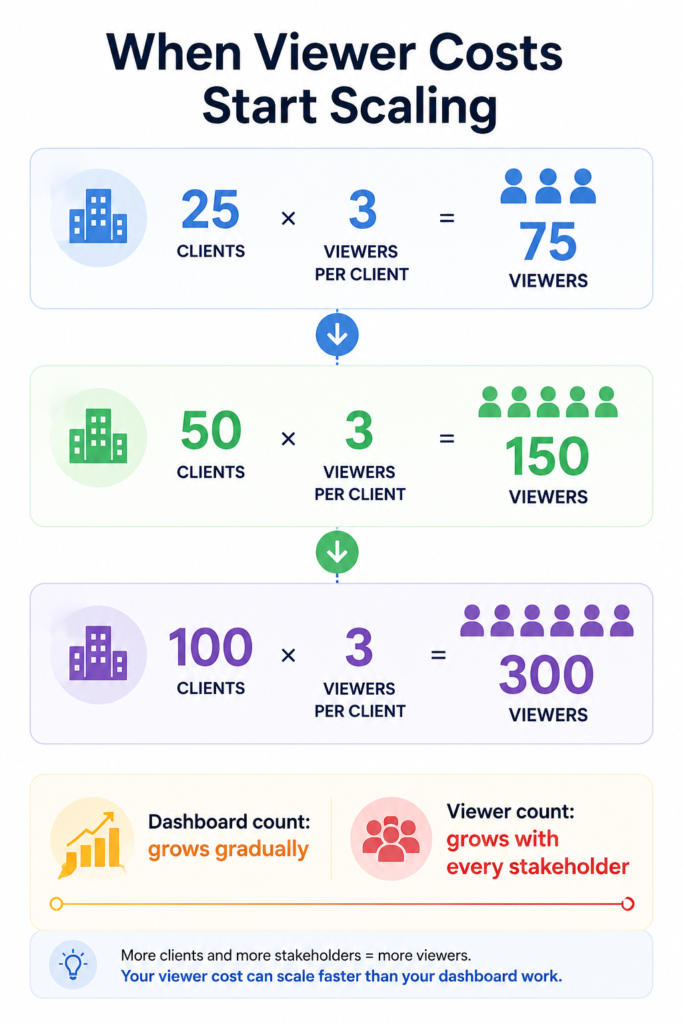
25 clients × 3 viewers = 75 viewers
The agency grows:
100 clients × 3 viewers = 300 viewers
The dashboard itself has not become four times harder to build. The number of people accessing it has increased.
If your platform prices access per user, your reporting costs might rise as your client base grows.
Power BI is a useful example. Microsoft states that Power BI Pro is a per-user licence. In shared capacity, users need Pro or Premium Per User to share and consume shared content. Content in qualifying Premium or Fabric capacity has different requirements, including access for users with free licences under specific conditions.
External sharing also has its own requirements. Power BI external recipients sign in to access shared content, with licensing depending on the workspace and capacity setup.
So the important question is not simply:
“How much does the dashboard cost?”
Ask:
“How much will it cost when everyone who needs access actually gets access?”
A Share Link Solves Access. It Does Not Solve Everything.
A shareable link looks like the simplest solution.
But before sending one to a client, ask:
- Is the link public?
- Does the viewer need to sign in?
- Can the link be forwarded?
- Can you revoke access?
- Does the viewer see only the intended data?
- Can they export or copy information?
Google Looker Studio supports both specific-user sharing and broader link sharing through its dashboard sharing options. Public link sharing allows people without a Google account to view the report.
This creates an important distinction.
A public dashboard might be suitable for:
- Public performance data
- Investor information
- Public statistics
- Marketing reports
It is a poor fit for:
- Client revenue
- Sales pipeline
- Customer information
- Private advertising performance
- Internal financial data
Google also provides controls for stopping access and managing whether users can reshare, change permissions, copy, print, or export content.
So “share by link” should never mean “send the URL and forget about access.”
What If Every Client Needs to See Different Data?
This is where agency reporting gets more complicated.
Imagine your agency manages three clients.
Client A
Google Ads + HubSpot
Client B
Meta Ads + Shopify
Client C
Google Ads + GA4
Each client needs a dashboard.
But Client A should never see Client B’s revenue. Client B should never see Client C’s campaign data.
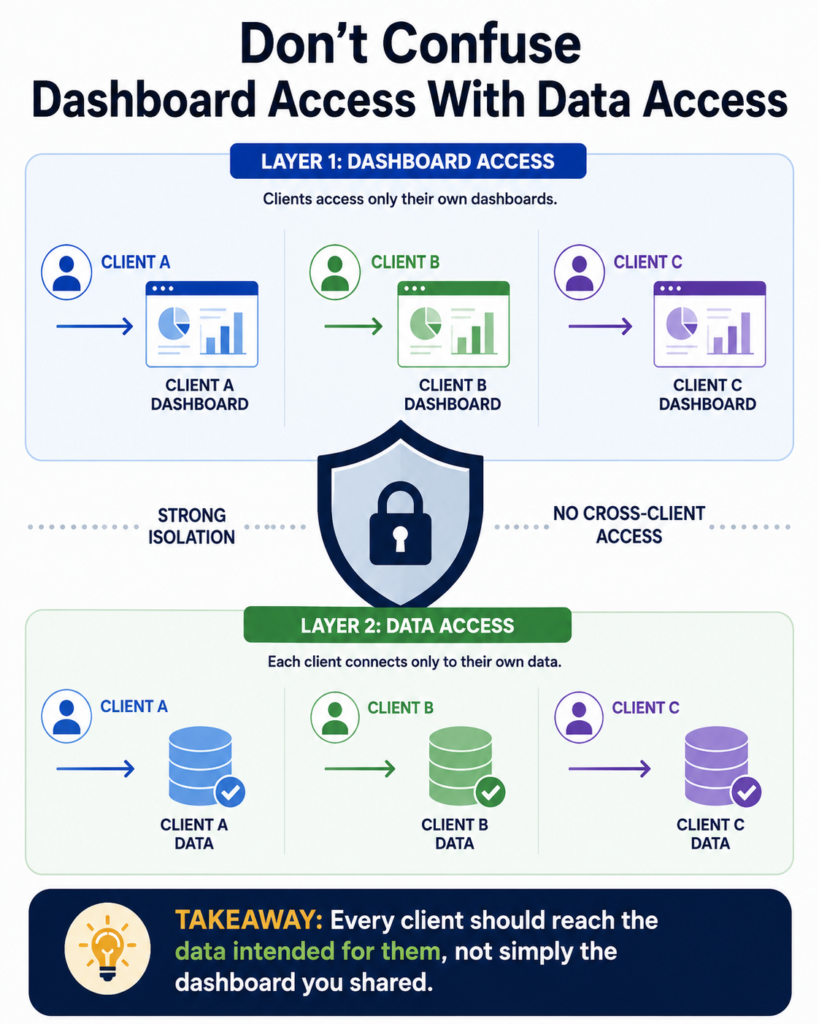
This means dashboard access and data access are two different problems.
Giving someone access to a dashboard does not automatically mean the underlying data is correctly isolated.
Google’s documentation separates report permissions from access to reusable data sources and explains how data credentials affect what viewers can access.
This matters even more when your agency has dozens of client accounts.
You need to think about:
Who is the user?
Which dashboard do they access?
Which data does the dashboard query?
Can another client reach that data?
For customer-facing analytics, Papercrane takes a tenant-specific approach. Its embedded analytics documentation states that each customer gets their own embed integration, environment, and data source credentials, with no shared dashboards or cross-tenant access.
When a Dashboard Should Live Inside Your Product
A share link works well when you have a known group of people who need access.
It becomes less suitable when analytics becomes part of your product.
Consider a SaaS company with 2,000 customers.
Each customer wants to see:
- Account activity
- Product usage
- Revenue
- Performance metrics
- Customer-specific trends
Sending individual dashboard links to 2,000 customers is a poor product experience.
A customer-facing dashboard works differently:
Customer logs into your product → Opens Analytics → Sees their own data
This is where embedded dashboard sharing makes sense.
Google Looker Studio supports embedding reports into websites and other contexts.
Papercrane’s embedded analytics is designed for SaaS products shipping dashboards to customers. The embedded dashboard can use the host product’s branding, including colours, fonts, logo, and spacing. Papercrane also documents isolated customer environments and data source credentials.
This creates two distinct use cases:
Agency reporting: Share dashboards with known clients.
SaaS analytics: Put customer-facing dashboards inside your product.
For the second use case, see Papercrane’s embedded analytics.
Which Sharing Model Fits Your Situation?
There is no single best way to share every dashboard.
| Situation | Suitable approach |
|---|---|
| Internal team | User-based access |
| Small group of known clients | Restricted sharing |
| Recurring agency reporting | Client-facing dashboard |
| Large customer audience | Embedded analytics |
| Public information | Public link |
| Monthly snapshot | PDF or scheduled report |
For example, an agency sending a monthly performance dashboard to three client contacts has a different requirement from a SaaS company giving analytics access to thousands of customers.
Looker Studio supports scheduled PDF delivery alongside links, direct sharing, and embedding, which shows why different distribution methods exist for different reporting needs.
The decision should come down to four factors:
Audience size → Data sensitivity → Access control → Cost
How to Share a Dashboard Without Paying Per Viewer
This is where the platform’s pricing model matters.
Papercrane’s current pricing includes shareable public links on the Free plan. Pro costs $50 per month and adds custom domains, removal of Papercrane branding, up to 20 dashboards, and up to five team members. Enterprise adds embedded analytics with per-tenant isolation, along with other enterprise features.
Papercrane’s pricing page does not list a separate per-viewer charge. Its embedded analytics page explicitly positions the offering around flat pricing rather than per-viewer pricing.
That distinction matters for agencies.
Imagine you manage 50 clients. Each client has three stakeholders who need access.
50 × 3 = 150 viewers
With a pricing model based on individual viewer licences, those 150 people become part of the cost calculation.
With Papercrane, the published plan structure does not add a separate line item for each dashboard viewer.
The exact plan you need still depends on your dashboard count, team size, branding requirements, and whether you need embedded analytics.
See Papercrane pricing.
Important distinction
Don’t confuse “no per-viewer charge” with “no usage costs.”
Papercrane’s AI usage is billed through credits. Its pricing page states that AI usage is separate from the Pro subscription.
So you should evaluate:
Platform plan + AI usage + required features rather than looking at viewer count alone.
Before You Share a Dashboard, Check These Five Things
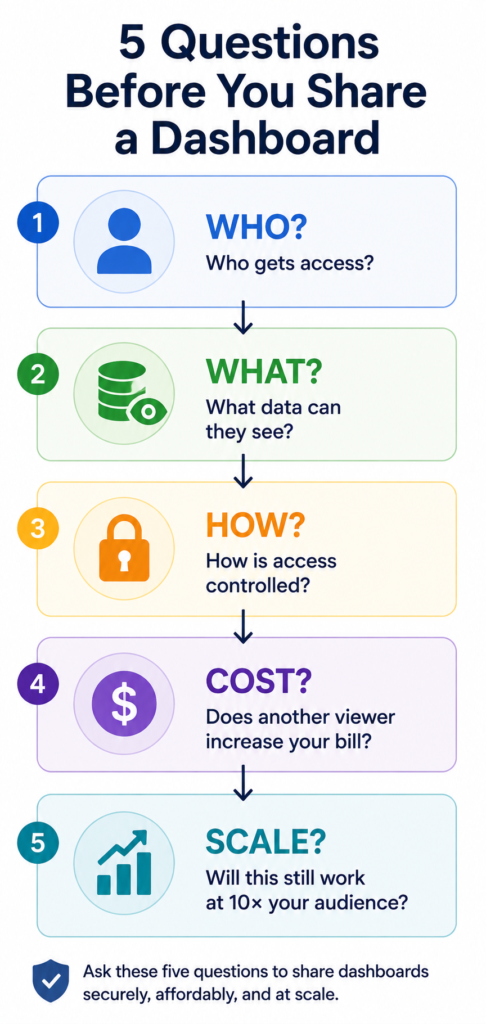
A dashboard sharing decision should pass five checks.
1. Who is viewing it?
Know whether the audience is internal, external, public, or customer-facing.
2. What data can they access?
Make sure the dashboard connects to the correct data and does not expose another client’s information.
3. How is access controlled?
Check whether users need authentication and whether you can remove access later.
4. What happens to your costs?
Find out whether additional viewers, users, capacity, or usage increase your bill.
5. Will the model work at 10× your current audience?
A sharing method that works for 10 clients might create problems at 100.
These questions are more useful than asking which platform has the easiest Share button.
Stop Treating Every Dashboard Viewer as a New Cost
Sharing a dashboard is easy.
Sharing it securely, controlling what each person sees, and keeping the cost predictable as your audience grows requires more thought.
For agencies, a simple client dashboard might be enough when a small group needs access. For SaaS companies, embedded analytics makes more sense when analytics becomes part of the customer experience.
Papercrane supports shareable dashboards, custom domains on Pro, and embedded analytics with per-tenant isolation on Enterprise. Its published pricing does not include a separate per-viewer charge.
If you’re building dashboards for clients, see our agency client reporting dashboard guide.
If you’re building analytics into your product, explore Papercrane’s embedded analytics.
And if you’re comparing plans, see Papercrane pricing.
FAQ
How do I share a dashboard with clients?
Use restricted user access, a controlled share link, an embedded dashboard, or a scheduled report based on your audience, security requirements, and platform.
Do dashboard viewers need a licence?
It depends on the platform and sharing model. Power BI, for example, uses per-user licensing for many sharing scenarios, while qualifying Premium or Fabric capacity changes the licensing requirements.
How do I share a dashboard without paying per viewer?
Look for a platform whose pricing does not add a separate charge for every viewer. Papercrane’s published pricing does not list a per-viewer charge, while its embedded analytics offering states flat pricing rather than per-viewer pricing.
Is it safe to share a dashboard through a link?
It depends on how the link is configured. Public link sharing gives broader access, while restricted sharing provides tighter control. Google documents both approaches for Looker Studio.
How do I share dashboards with clients without exposing other clients’ data?
Use separate access controls and data environments where required. For customer-facing analytics, Papercrane documents isolated customer environments and separate data source credentials.
What is a customer-facing dashboard?
A customer-facing dashboard is an analytics interface designed for external users such as customers, clients, partners, or account holders.
When should I embed a dashboard instead of sharing a link?
Embedding makes more sense when analytics forms part of your product or customer portal, especially when many customers need access to their own data.
What is a dashboard viewer licence?
A dashboard viewer licence is a user licence assigned to someone who primarily consumes or interacts with dashboards rather than building or administering them. The exact licensing rules vary by platform.