Google Ads Dashboard: Automated PPC Reporting for Clients
August 31, 2026
·
Tim Liu
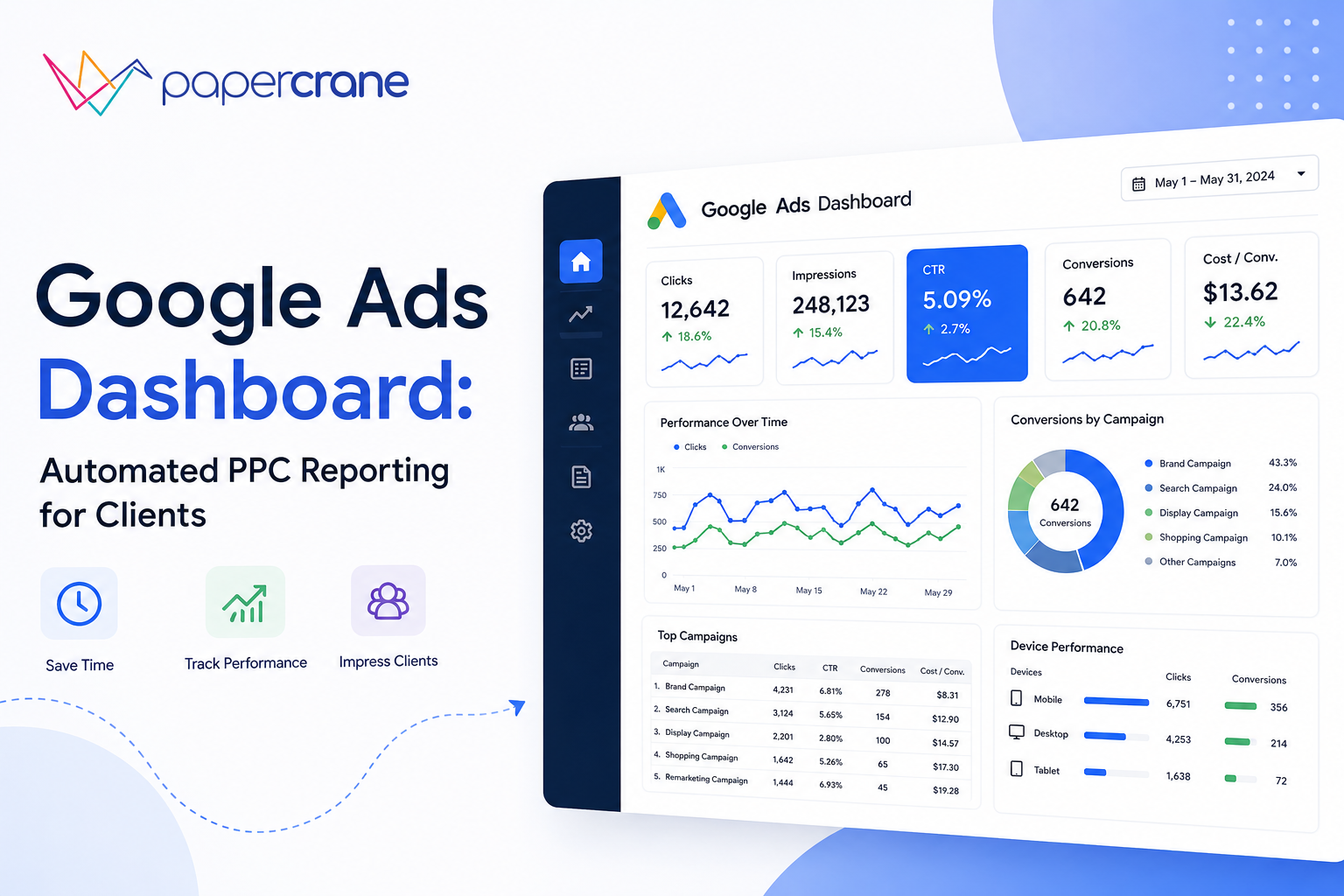
A client messages you at 4:47pm on a Friday: “Why did conversions drop this week?” You have the answer somewhere, across three MCC accounts and a spreadsheet you last updated on Tuesday. By the time you’ve exported CSVs and rebuilt the chart, the client has already drawn their own conclusion.
This is the actual problem a google ads dashboard is supposed to solve for agencies not “tracking metrics in one place”. If your reporting setup can’t do that, it’s not a dashboard. It’s a delay with a nicer font.
Why the Standard Google Ads Dashboard Breaks Down for Agencies
Google’s native interface was built for one advertiser looking at their own account, not an agency managing twenty. The MCC view isn’t client-safe, you can’t hand a client a login without exposing every other account you manage.
There’s no white-labeling, no automated client-facing export, and every time Google rolls out a redesign, saved views and custom columns can shift or disappear without warning.
Some people still search for this under its old name, the adwords dashboard but the limitation hasn’t changed with the rebrand: it’s an internal tool, not a client communication tool.
If you want your Google Ads account feeding a system built for sharing, not just viewing, you can connect your Google Ads account directly rather than exporting from the native interface. For reference on what the native interface actually supports, Google’s own Ads Help Center documents the current dashboard layout is worth checking before you assume a feature exists.
The Real Cost: Hours, Not Just Hassle
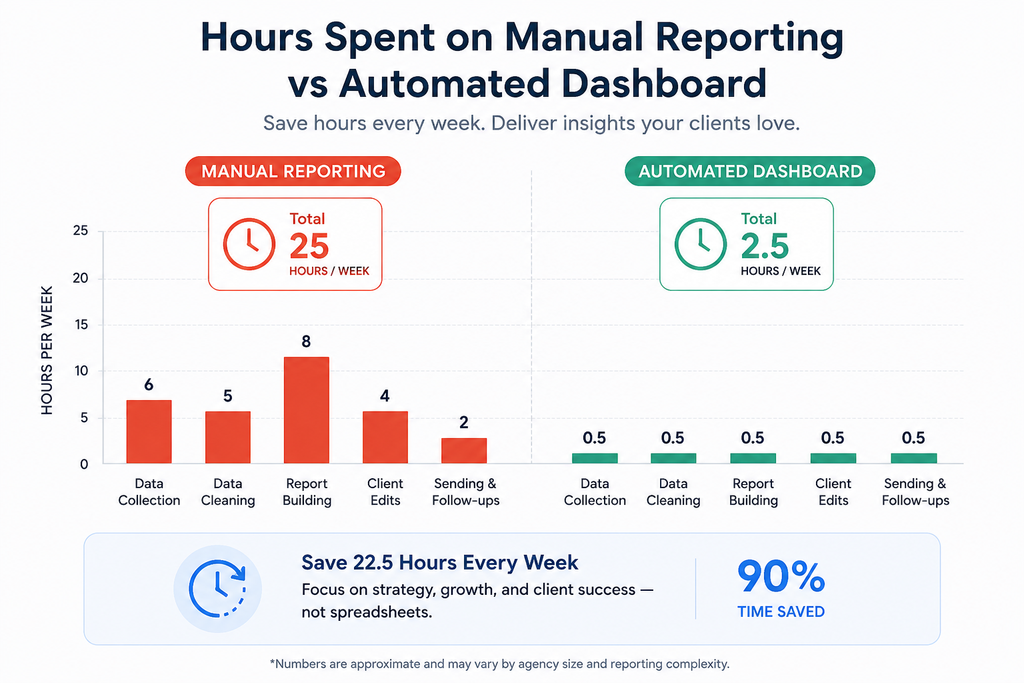
Agencies that cross roughly 10 hours a week on manual reporting are already past the point where a spreadsheet makes sense.
That’s not a rule of thumb, it’s the threshold where the labor cost of manual google ads reporting exceeds what a reporting tool costs to run. Every hour spent formatting a slide deck is an hour not spent adjusting bids, testing ad copy, or catching a budget pacing issue before it burns through spend.
Multiply that by every client on your roster, and “we’ll just export it manually” stops being a scrappy habit and starts being the reason your best account manager is doing data entry instead of strategy.
The Trust Problem. Not Just the Time Problem
Here’s what most articles on this topic miss: clients don’t churn because performance dipped. They churn because they felt out of the loop when it did. A monthly report is a monologue, you talk, they listen, and for the 29 days in between, they’re guessing. A live ppc dashboard changes that dynamic entirely. Instead of “prove it to me at the end of the month,” the client can check in whenever they want, which means the conversation you have on a call is about strategy, not about defending a number they’re seeing for the first time.
This is the gap most Google Ads dashboard content ignores. Metrics matter, but access to metrics on the client’s schedule, not yours is what actually protects the relationship.
What a Proper PPC Dashboard Actually Needs
A dashboard that’s built for agency-client reporting, not just personal account tracking. It needs to cover a few non-negotiables:
- The right KPIs, not vanity metrics. A google ads kpi dashboard should surface CPA, ROAS, conversion rate, and pacing against goal. It is not just about impressions and clicks, which look good and mean little.
- Live data, not stale exports. If the client is looking at numbers from three days ago, you haven’t solved the trust problem, you’ve just made the delay prettier.
- White-labeling without asterisks. Many tools gate full brand removal like custom domain, custom sender, and no vendor logo, behind a higher-priced tier. Check this before you commit, not after a client spots someone else’s logo on your report.
- Multi-client, multi-account support. Agencies need to move between accounts without re-authenticating or rebuilding views from scratch.
- Anomaly alerts. A ppc reporting dashboard that only reports monthly can’t warn you about a budget pacing issue on day 4.
How Papercrane Closes These Gaps
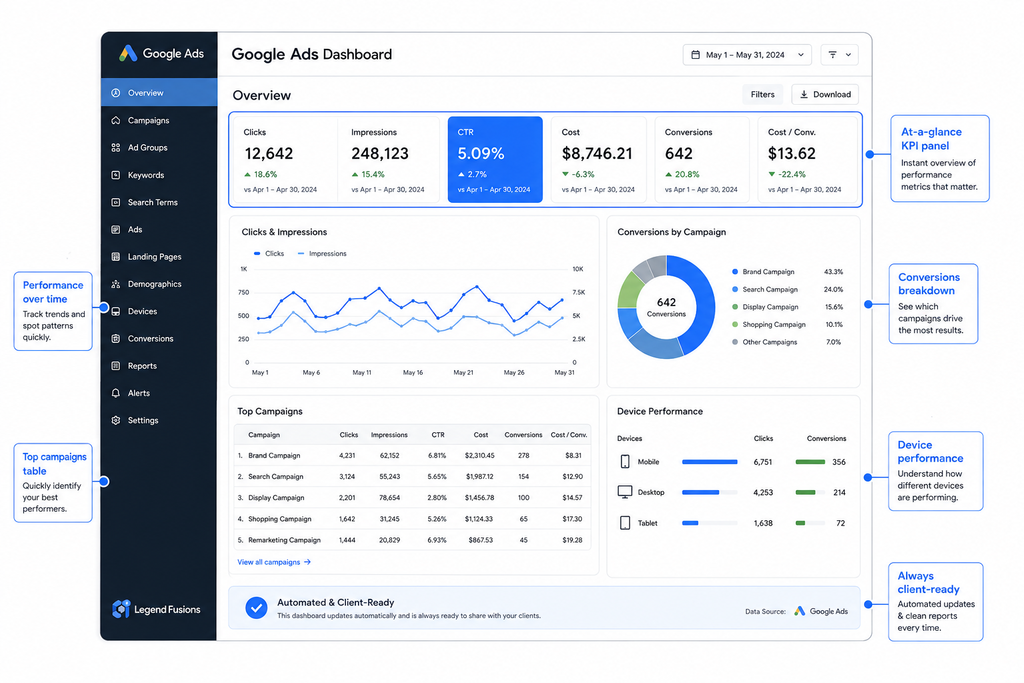
Papercrane connects directly to your Google Ads account through the API, no CSV exports, no manual copy-paste into slide decks. Every agency client gets a fully white-labeled google ads performance dashboard, with no gated tier hiding your own branding behind theirs.
The setup is three steps:
- Connect your Google Ads account (and any others you manage).
- Select KPIs relevant to that client’s goals, using pre-built templates or a custom view.
- Share a live link, or schedule automated email or Slack digests on whatever cadence the client actually wants.
Want to see what’s actually included versus what’s gated elsewhere? See how white-label reporting works for agencies for a closer look. And if you want the technical detail on what a direct API connection can pull that a manual export can’t, Google’s Google Ads API documentation covers the data available at that level.
FAQ
What is a Google Ads dashboard?
A Google Ads dashboard is a visual interface either Google’s native tool or a third-party platform. It displays campaign metrics like clicks, conversions, CPA, and ROAS in one place instead of raw account data.
How do I create an automated Google Ads report for clients?
Connect your Google Ads account to a reporting platform via API, select the KPIs relevant to the client, and schedule automatic delivery by live link, email, or Slack. No need of manually building reports each period.
Is a Google Ads dashboard the same as an Adwords dashboard?
Yes. Google Ads was formerly called Google AdWords, so “Adwords dashboard” and “Google Ads dashboard” refer to the same tool under its old and current names.
How much time does automated PPC reporting save?
Agencies manually building reports typically spend several hours per client each week; automated dashboards remove most of that by pulling live data directly instead of requiring manual exports and formatting.
What’s Next?
A google ads dashboard built for agencies isn’t about prettier charts. It’s about giving clients access before they have to ask, and giving your team back the hours currently lost to formatting instead of optimizing.
Start your free Google Ads dashboard and see the difference between a report a client waits for and one they can already see.